

Every network has a map. You don’t always see it, but it’s there — determining how your data travels, where a failure hits hardest, and whether your infrastructure holds up when things get busy. That map is the topology of network, and picking the wrong one quietly kills performance before you ever touch a router.
Network topology is the arrangement of devices (nodes) and connections (links) in a computer network. It defines how computers, servers, and other devices are connected and how data flows between them. Get that right and your network scales cleanly. Get it wrong and you’re troubleshooting the same bottlenecks every quarter.
This guide breaks down every major type, what each one actually does in practice, and how to match the right layout to the right environment.
Physical vs. Logical: The First Split You Need to Understand
Most people think of topology as just cabling — where the wires go. That’s only half the picture.
There are two main types of topology: Physical Topology, which is the actual physical layout of cables and devices, and Logical Topology, which describes how data moves across the network regardless of physical layout.
Here’s why that matters. A building’s floor wiring might look like a star — everything connects to a central switch. But the logical flow of data could follow ring or bus rules depending on the protocol running underneath. Logical topology refers to how data flows in the network, such as CSMA/CD in Ethernet or token passing in ring networks.
Software-defined networking decouples the control plane from physical hardware, allowing logical topology to be reconfigured through software without physical changes. In 2026, this distinction matters more than ever — logical topology can shift overnight in a software-defined environment, while physical rewiring obviously can’t.
Anyone managing enterprise infrastructure knows you can’t troubleshoot a network you only understand physically. You need both layers.
What the Research Shows
The percentage of enterprises that automate more than half of their network activities will climb from less than 10% in mid-2023 to 30% by 2026, according to Gartner. That jump directly ties to topology choices — networks built on rigid, single-point designs don’t automate cleanly. The ones scaling fastest in 2026 are built on hybrid and mesh principles that support dynamic rerouting and software control.
By 2026, Gartner also forecasts that 50% of enterprises will be using AI to automate “day 2” network operations — a substantial rise from fewer than 10% in mid-2023. Day 2 operations include monitoring, upgrades, and routine maintenance. None of that automation works reliably without a topology that’s fault-tolerant by design.
The lesson: topology of network isn’t a setup decision you make once. It’s infrastructure strategy.
The 6 Main Network Topology Types — Broken Down
1. Bus Topology — Simple, But Brittle
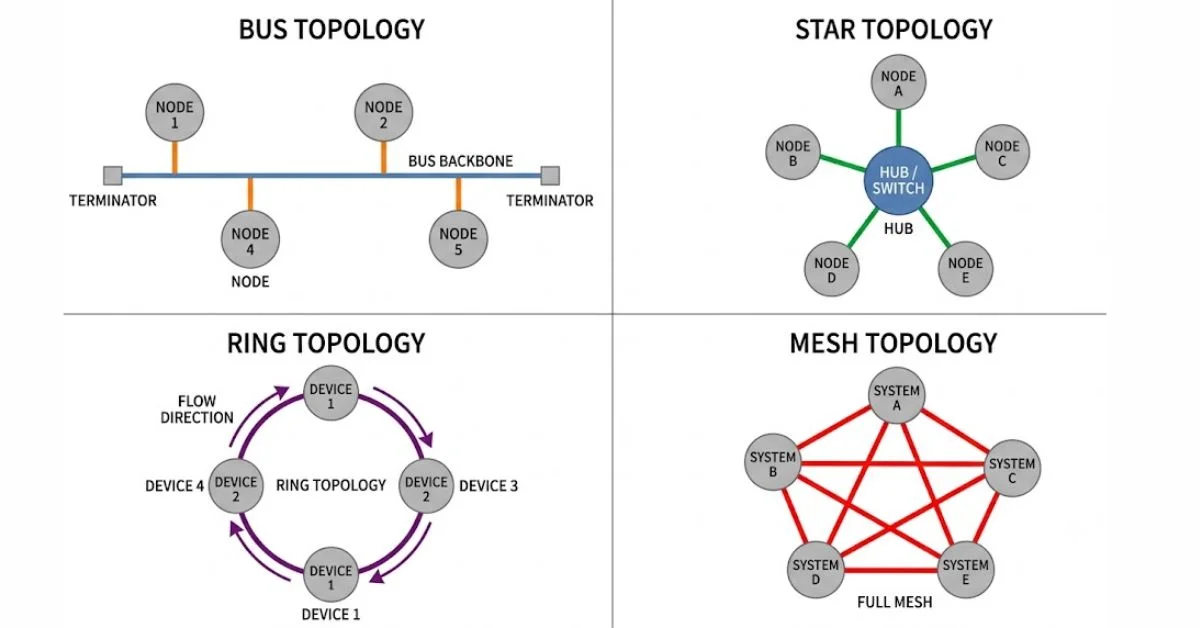
A single backbone cable connects all devices. All transmissions travel this main line, and only one device can transmit at a time.
Bus topology was common in early LANs. The appeal was obvious — minimal cabling, quick to set up, cheap. The downside: the entire network goes down if the central cable fails. There’s no redundancy, no fallback path. Bus topology is suitable for very small networks or temporary setups where simplicity is more important than performance.
In 2026, you’ll rarely see bus topology in production environments. It survives mainly in legacy systems and testbeds.
2. Star Topology — The Modern Standard
Star topology is the most widely used topology in modern networks. All devices are connected to a central device such as a switch.
The practical advantage is isolation. When one device fails, it doesn’t take the network with it — the central switch keeps everything else running. That’s why star is the default for office LANs, small business setups, and most home networks.
This is the most widely used among types of LAN topology in enterprise settings. The tradeoff is obvious: if the central switch fails, everything connected to it goes down. That makes switch redundancy a non-negotiable in any serious deployment.
3. Ring Topology — Structured, With One Fatal Flaw
In ring topology, devices connect in a circular chain. Data moves in one direction around the loop — or both directions in dual-ring setups — until it reaches the destination. Every device acts as a repeater, passing data along to the next node.
The structure gives ring topology predictable performance. There’s no collisions, no congestion at a single hub. But break the ring at one point and the entire network can go down. Dual-ring configurations solve this by providing a backup path, which is why you see them in industrial networking and telecom backbones rather than typical offices.
4. Mesh Topology — Maximum Redundancy, Maximum Cost
A mesh topology is an extensive framework of point-to-point connections in which each device on the network is connected to another device, transferring data solely between the two units. There are two types: full mesh and partial mesh. In full mesh, each node has n-1 connections. A full mesh topology, which provides a lot of redundancy, is normally reserved for network backbones. In partial mesh, only a few nodes are connected to all other nodes.
Full mesh is the topology of choice when downtime is simply not an option — financial trading floors, hospital networks, military infrastructure. The cable count explodes fast (n nodes = n×(n-1)/2 connections), which is why partial mesh is far more common in practice.
Each node connects to every other node in full mesh. Partial mesh is used in backbone networks or for critical links.
5. Tree Topology — Hierarchical and Scalable
Tree topology combines the star’s branching structure with a linear backbone. It’s frequently used in large campus networks.
Think of a university or corporate campus — buildings branch off a core backbone, floors branch off building switches, individual devices branch off floor switches. It scales predictably and maps cleanly to organizational hierarchy.
The risk is the same as bus: if the backbone fails, entire branches go offline. Good tree design always includes backbone redundancy.
6. Hybrid Topology — What Most Real Networks Actually Are
Hybrid topology combines features of multiple network topologies. For example, a ring backbone linking multiple star networks.
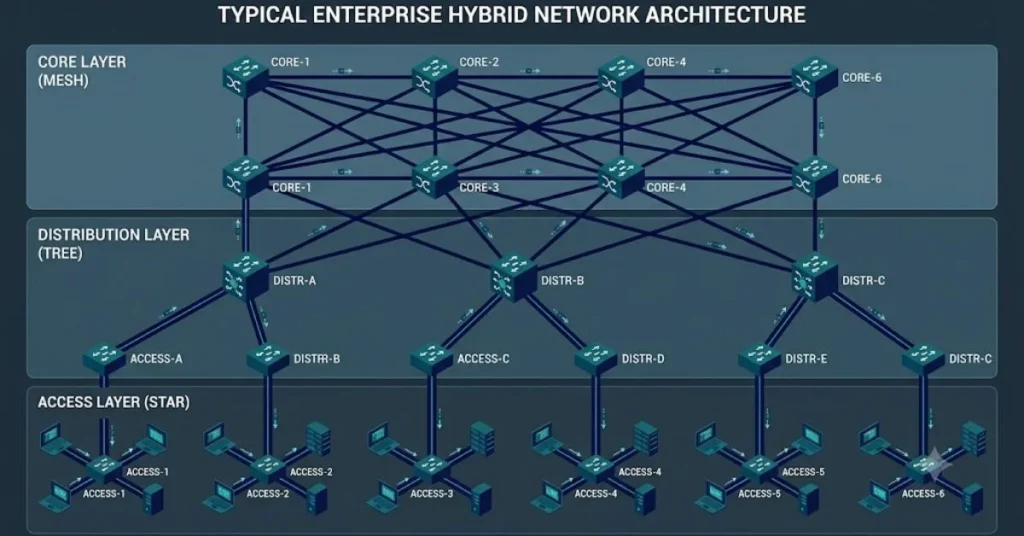
No enterprise runs a textbook-perfect single topology in 2026. What you actually find is star networks at the floor level, tree structures connecting floors and buildings, mesh backbones connecting data centers, and bus segments in legacy corners of the infrastructure. Hybrid designs combining multiple topology types provide optimal balance in cost, fault tolerance, and scalability.
Hybrid is the answer to the question no single topology can fully answer: how do you balance uptime, cost, and growth in one network?
How to Pick the Right Topology for Your Network

Choosing the right topology directly affects network speed, uptime, and how easily you can grow or troubleshoot the environment.
A typical breakdown at different scales looks like this:
- Small office (under 20 devices): Star. Central switch, simple management, easy troubleshooting.
- Medium business (20–200 devices): Star with tree extension. Floors or departments each get their own star, all feeding into a core switch.
- Large enterprise/campus: Tree with mesh backbone. Redundant core, hierarchical distribution.
- Mission-critical (hospitals, finance, telecom): Mesh or dual-ring for the backbone, star at access layer.
When comparing types of LAN topologies, focus on device density, cabling feasibility, and future expansion. Star network layout is ideal for floor-level device access. Tree topology fits multi-floor or department-specific LANs. Bus topology works for test environments.
Professionals managing networks at scale know: the topology you choose on day one is often the topology you’re troubleshooting for years. Get the redundancy right from the start.
Topology and Network Security
This angle often gets skipped in basic topology explainers. But the layout of your network directly affects how far a breach can spread.
Segmented topologies enable better control over access points and traffic direction. Logical layouts can isolate critical systems, enforce ACLs, and reduce lateral movement in the event of a breach.
A flat star network where every device connects to one switch gives attackers a wide lateral movement path once they’re inside. A segmented tree or hybrid topology — with VLANs enforced at each layer — limits how far a compromised node can reach. This is now standard thinking in enterprise security, and it starts at the topology level.
Common Topology Mistakes IT Teams Still Make
Professionals who’ve managed growing networks consistently run into the same set of problems:
Single point of failure ignored: Star is great until the central switch dies. Star deployments without a redundant switch pair are one hardware failure from a full outage.
Physical and logical topologies mismatched: The physical cabling is star, but nobody mapped the logical flows. Troubleshooting becomes guesswork.
Topology not documented: The original network engineer left three years ago. Nobody knows what connects where. Now a failure becomes a detective job.
Bus segments buried in hybrid networks: Old bus segments from legacy installs still live inside otherwise modern hybrid networks, becoming invisible bottlenecks.
Conclusion
The topology of network isn’t a technical footnote — it’s the backbone of every performance, security, and scaling decision your infrastructure will face. Whether you’re running a small office star layout or designing a hybrid campus network for thousands of endpoints, the underlying topology determines how failures cascade, how fast data moves, and how much room you have to grow.
With Gartner’s data pointing to 30% of enterprises automating more than half of their network activities by 2026, topology choices that support software control, redundancy, and dynamic routing aren’t optional anymore. They’re the baseline. Start with the right map — everything else builds on it.
FAQs
What is topology of network in simple terms?
It’s the arrangement of how devices in a network are connected — both physically (where cables run) and logically (how data travels). It’s essentially the blueprint of your network.
Which network topology is most commonly used today?
Star topology is the most widely deployed, especially in office and enterprise LANs. It’s easy to manage, and a single device failure doesn’t affect the rest of the network.
What’s the difference between physical and logical topology?
Physical topology describes where cables and hardware are placed. Logical topology describes how data actually flows — which can be completely different from the physical layout, especially in software-defined networks.
When should I use mesh topology?
When uptime is non-negotiable. Mesh topology provides multiple paths for data, so a single link failure doesn’t bring the network down. It’s expensive but used in backbones, data centers, and critical infrastructure.
Can a real network use more than one topology type?
Yes — and most do. Hybrid topology combines multiple types to balance cost, performance, and reliability. A typical enterprise might use star at the access layer, tree for building connections, and mesh for the data center backbone.
