

Every deploy has a dirty secret. The moment you push new code and clear your cache, your website is essentially naked — and the first real visitor to arrive pays the full price for it. That’s where a warmup cache request comes in. And if you’re not using one, someone’s bad first impression is quietly killing your metrics every single day.
Here’s the deal: speed isn’t just a nice-to-have anymore. In 2026, people don’t wait. They click the back button. And your server, fresh after a deploy with an empty cache, is making them wait.
What Exactly Is a Warmup Cache Request?
A warmup cache request is a synthetic or automated HTTP request sent to your application or Content Delivery Network (CDN) with the specific intent of populating the cache. When you deploy new code or purge your cache, the storage is empty.
It’s a deliberate HTTP request that your system sends — not a real user — with one clear goal: fill your caches before anyone visits your site. Instead of waiting for visitors to slowly populate the cache, a deployment script, cron job, or internal tool hits important URLs right after a new deployment, a cache purge, or invalidation.
Think of it the way a restaurant thinks about mise en place. The chef doesn’t chop onions after the customer orders. Everything’s already prepped, sliced, and ready. A warmup cache request is the same concept — prepping your digital kitchen before the dinner rush.
When there is a cache miss, the server will perform backend logic, execute database queries, and assemble a full response — a process that is especially costly in dynamic applications where data processing demands are high. Warmup requests cut that entire process out of the equation for real users.
The Cold Cache Problem Nobody Talks About Openly
Without cache warming, the first visitor after a deployment often encounters slower performance. This creates an inconsistent user experience. A properly configured warmup cache request ensures that no visitor becomes the “test case” for your infrastructure.
And the timing couldn’t be worse. Think about when cache gets wiped:
- After every new deployment
- After a CDN purge triggered by a content update
- After scheduled cache expiration intervals
- After server restarts
That window — right after a deploy or cache wipe — is exactly when your best users and Googlebot often arrive. Early-morning traffic spikes. Launch emails going out. Social media links hitting simultaneously. All of it landing on a cold, unprepared server.
Studies consistently show that a one-second delay in page response can reduce conversions by up to 7%, and Google’s own ranking signals now explicitly reward fast-loading experiences through Core Web Vitals. Missing that window isn’t just a UX issue — it’s a business one.
How a Warmup Cache Request Actually Works
The mechanics aren’t complicated. What makes implementation tricky is doing it intelligently.
The system first identifies the pages and resources that should be cached — homepages, category pages, APIs, and frequently accessed content. Automated requests then simulate user interactions, loading pages on the server and allowing the caching layer to store the output. The cached response is displayed to future users instead of dynamically generated responses.
There are two main approaches teams take:
Manual warmup works well for small sites or one-off launches. You maintain a list of priority URLs and hit them with a script after each deploy. Simple, controllable, auditable.
Automated warmup is where serious infrastructure lives. Automated warmup systems dynamically identify critical resources, adjust warmup intensity, and respond to changing traffic behavior, making them more suitable for large-scale environments.
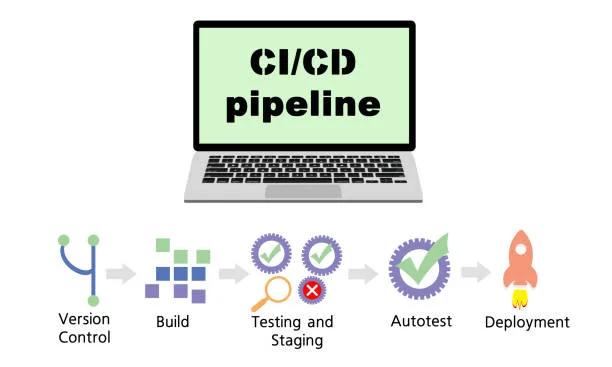
Most teams combine both — manual priority lists baked into automated CI/CD pipeline triggers.
What the Research Shows: Real Performance Impact
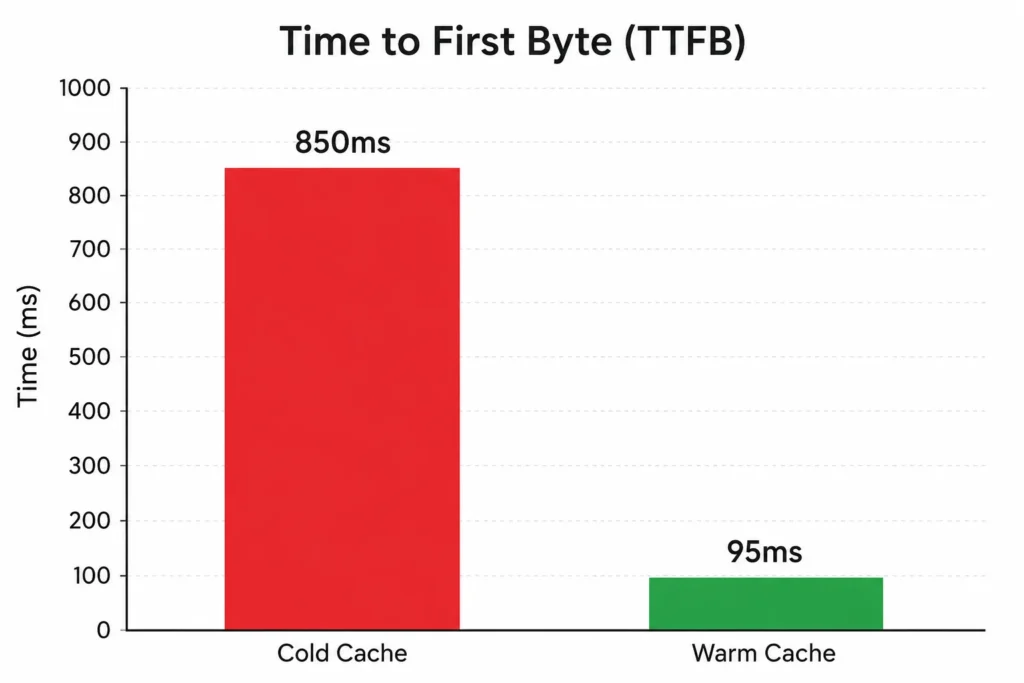
One real documented example: origin TTFB of 850ms dropped to 45ms after proper warmup implementation. That’s not a marginal improvement. That’s a transformation.
According to Google’s web performance documentation, cached responses reduce Time to First Byte (TTFB) by up to 70% compared to uncached requests.
This approach reduces TTFB, lowers origin server load, and removes the “first-visit penalty” that typically occurs after deployments, cache purges, or restarts.
And it goes beyond raw speed numbers. A news website that struggled with user retention due to slow loading articles saw their average page speed increase significantly after employing warmup cache requests, leading to a 30% boost in reader engagement. A SaaS provider using the same strategy reported instant feature access for users at launch with no lag and minimized drop-off rates.
Those aren’t edge cases. They’re what well-configured cache warming actually delivers.
Why Warmup Cache Requests Are an SEO Issue, Not Just a Dev Issue
SEO teams often ignore this entirely. That’s a mistake.
Server response speed is affected by TTFB — Time to First Byte — which directly impacts overall speed of your page or site and is one element of Core Web Vitals. Slow TTFBs slow rendering time, causing delays in displaying content. This results in lower performance for users and for search engine crawlers.
Google’s March 2026 Core Web Vitals update doubled down on real-user speed signals. That means Googlebot hitting your site cold — right after a deployment — could record a sluggish TTFB that feeds into your ranking signals.
Cold cache significantly increases TTFB because content must be retrieved from the origin server. This delay negatively impacts Core Web Vitals such as Largest Contentful Paint (LCP), often leading to lower search visibility and poorer user engagement.
Search engines can access pages faster when cached versions are ready. This can help crawlers move through the site more efficiently. For large sites with deep crawl budgets, that efficiency gain compounds over time.
When to Trigger a Warmup Cache Request
Timing matters as much as execution. The four moments that demand cache warming:
Post-deployment: Every new release should trigger a warmup script automatically before traffic is routed to the new version.
After cache invalidation: Any manual purge, CDN flush, or configuration change creates a cold cache window. Warm it immediately.
Scheduled intervals: Many sites schedule warmup every 12–24 hours, especially when cache TTLs are set to expire overnight.
Pre-launch traffic spikes: Flash sales, press coverage, email campaigns — if you know traffic is coming, warm the cache before it arrives. During product launches, flash sales, or viral traffic events, thousands of users may hit your website simultaneously. A warmed cache absorbs most requests at the CDN or memory level, protecting databases and preventing outages.
Common Mistakes That Break Your Cache Warming Strategy
Getting this wrong can actually make things worse.
The biggest risk: flooding your own origin server. If a warmup script sends thousands of requests to an origin server simultaneously without proper rate limiting, it can mimic a DDoS attack. Staggering requests and monitoring origin health during the process is essential.
Other pitfalls worth knowing:
- Warming non-cacheable URLs — dynamic pages with user-specific content don’t cache. Skip them.
- Ignoring regional CDN nodes — when CDN edge nodes start cold, users in certain regions experience slower first loads. Issuing distributed warmup cache requests across edge locations ensures consistent latency worldwide.
- Not updating your priority URL list — as your site grows, the pages that matter most change. Your warmup list should reflect that.
- Skipping monitoring — watch your cache hit ratio (aim above 90%), TTFB in synthetic monitors across regions, and origin request volume right after deploy. A sudden drop in origin traffic is the best confirmation your warmup worked.
Practical Ways to Implement It Right Now
You don’t need expensive tooling to start.
Simple script approach: Use curl or a Python script hitting your top 20-30 URLs sequentially after each deploy. Add a 1-2 second delay between requests to avoid hammering your origin.
CI/CD integration: Add the warmup script as a post-deploy step in your pipeline. It runs automatically, every time, with zero manual intervention.
CDN-native warmup: Platforms like Cloudflare, Fastly, and AWS CloudFront have built-in cache warming features or edge hooks specifically for this. Many edge platforms now expose warmup hooks precisely because cold starts were killing performance.
Prioritize your critical path: It’s most efficient to warm the “critical path” — the homepage, main category pages, and top-selling products. You don’t need to warm every single page.
And yes — using a custom User-Agent like Cache-Warmer-Bot keeps your warmup traffic identifiable in logs and avoids triggering bot detection systems. Good practice all around.
The Bigger Picture: What Cache Warming Can’t Do
One thing worth being clear about: warmup cache requests make your existing optimizations work better — they don’t replace them.
Warmup cache requests don’t fix heavy code, inefficient queries, or huge images. They make sure the optimizations you’ve already built actually deliver from the very first request.
If your uncached response takes 4 seconds, warming the cache delivers a cached version in milliseconds. But the underlying 4-second generation time still matters for cache misses on new pages. Warmup is amplifier, not foundation.
Pair it with image optimization, efficient database queries, a well-configured CDN, and clean code — and then warm that cache on every deploy. That combination is what genuinely fast websites run on in 2026.
Frequently Asked Questions
Q1: Does a warmup cache request affect my real users’ data in analytics?
No. Warmup requests are typically sent with specific User-Agent headers that analytics tools either filter automatically or can be manually excluded. Real user sessions remain clean.
Q2: How is a warmup cache request different from browser prefetching?
Browser prefetching is client-side — the browser predicts what a user might click next and preloads it. A warmup cache request is server-side and infrastructure-level. It happens before any user is even on the site.
Q3: Will Googlebot warm my cache for me if I don’t do it manually?
Not reliably. Googlebot crawls selectively and won’t hit all priority pages when you need them warmed. You can’t depend on crawlers to solve a deployment timing problem.
Q4: Is there a risk of getting flagged as malicious traffic by my own CDN?
Minor risk if done carelessly. Using a clearly labeled User-Agent, staggering requests, and staying within rate limits keeps warmup traffic identifiable and non-threatening to your infrastructure.
Q5: How often should I run cache warming beyond post-deploy triggers?
For high-traffic sites, scheduling warmup every 12-24 hours aligned with your cache TTL settings is standard practice. Sites with frequent content updates may run it more often.
