


Your football match is on. The camera pans fast across the pitch — and suddenly the picture turns to mush. That smeared, blurry mess isn’t your TV dying. It’s a frame rate problem. And Intelligent Frame Creation was built to fix exactly that.
If you own a Panasonic TV and have never poked around in your picture settings, there’s a good chance this feature is sitting there, either dormant or running in the background without you noticing. Either way, understanding what it does — and when to switch it off — can genuinely change how you experience TV in 2026.
What Intelligent Frame Creation Actually Does
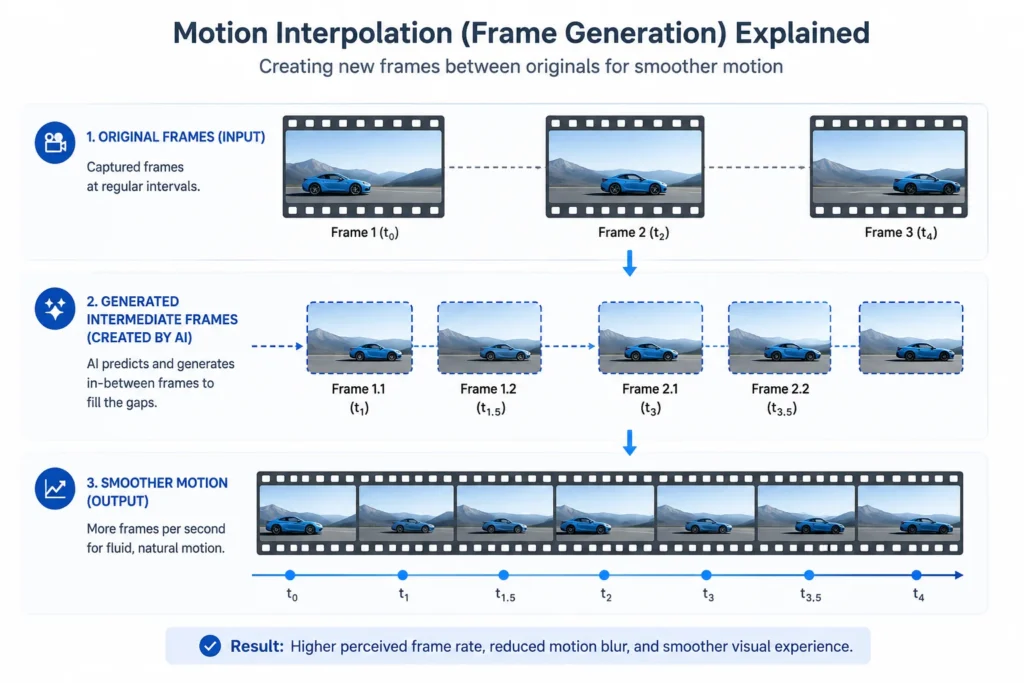
Intelligent Frame Creation, or IFC, is Panasonic’s motion interpolation technology. It aims to reduce the blur effects viewers experience while streaming videos by creating and fading in additional frames. The TV analyzes the change in movement between frames and generates artificial ones — all to make motion appear smoother.
Think of it like this: most broadcast content runs at 25 or 30 frames per second. That’s fine for static shots. But the moment a footballer sprints across the screen or a car chase kicks off, those frames can’t keep up with the motion. The result? Blur. Judder. A flickery mess that breaks immersion completely.
IFC steps in between those existing frames and builds new ones — calculated predictions of what the image should look like at that precise moment. It’s a smart interpolation trick, and when it works well, you barely notice it’s happening. Motion just looks cleaner.
IFC vs IFC Pro: What’s the Difference?
Panasonic offers two versions of this technology. IFC comes with the standard TV range, while IFC Pro is reserved for higher-end models. Both aim to reduce motion blur by intelligently adding frames between existing broadcast frames — creating a hybrid of the frame before and the frame after.
IFC Pro goes deeper. It applies more sophisticated motion estimation, handles complex scenes with layered movement more accurately, and produces fewer visual artifacts at higher intensity settings. If you’re spending serious money on a Panasonic OLED or high-tier LED, IFC Pro is what justifies part of that premium.
The standard IFC works well for everyday TV and sports. IFC Pro is where things get genuinely impressive — especially on 4K content with fast camera work.
The Soap Opera Effect: Why Some Viewers Hate It
Here’s the honest part. Not everyone loves Intelligent Frame Creation. Film fans, in particular, tend to despise it.
The phenomenon is commonly referred to as the “soap opera effect,” which can render films unnaturally smooth. Users can adjust the intensity up or off and disable the feature if a more natural result is preferred.
The reason this happens is baked into how cinema works. Movies are shot at 24 frames per second — and that frame rate isn’t just a technical choice. It’s part of the look of film. The slight motion blur, the cinematic weight of each frame — that’s intentional. When IFC jumps in and creates extra frames, it strips that quality away. Suddenly, a Christopher Nolan film starts looking like a daytime soap filmed in a studio. It’s jarring for anyone with an eye for it.
So the feature isn’t inherently bad. It’s context-dependent. Which brings us to when it actually makes sense.
When to Turn It On — and When to Kill It
A useful rule of thumb: turn IFC off for movies to preserve the cinematic feel, and turn it on for sports or gaming for smoother motion.
That’s the cleanest way to think about it. Here’s a breakdown that covers most viewing scenarios:
Turn IFC ON for:
- Live sports — football, cricket, F1, basketball
- News broadcasts with fast studio camera cuts
- Wildlife documentaries with rapid motion sequences
- Gaming (though input lag is worth checking — more on that below)
Turn IFC OFF for:
- Any cinematic film content
- Animated movies where the frame consistency matters
- Older classic films where the original grain and pace are part of the art
Most Panasonic TVs let you set this per input or per mode, so you’re not stuck with one global setting. That’s worth knowing.
What the Research Shows: Real User Findings
Detailed analysis of user experience data across home theater communities reveals a clear pattern — IFC performs best at moderate settings, not maximum. Users who tested multiple IFC intensity levels found that the mid-range settings reduced smear and blur in scrolling credits and fast sports sequences, while maximum settings introduced visible artifacts and occasional jump issues in complex scenes.
The takeaway from those findings is that Panasonic’s technology works best when it isn’t pushed too hard. Min or Mid settings tend to deliver the smoothest experience without the visual glitches that come with Max.
There’s also a latency consideration that often gets overlooked. When gaming, any extra image processing adds delay between your input and the on-screen response. For competitive gaming, that extra latency matters. Most Panasonic models include a dedicated Game Mode that bypasses IFC entirely, which is the right call for anyone serious about response times.
How It Compares to Other Brands’ Motion Tech
Panasonic didn’t invent motion interpolation — every major TV brand has its own version of it. Various manufacturers market this same underlying technology under different names: Auto Motion Plus from Samsung, MotionFlow from Sony, TruMotion from LG, Fine Motion Advanced from other makers. LCDs with frame interpolation tend to have a more aggressive smoothing effect, adding more frames — though this can also introduce more artifacts and problems when the processor miscalculates how motion should flow.
Panasonic’s IFC is generally regarded as one of the more conservative implementations. It doesn’t throw extra frames at the image as aggressively as some Samsung or Sony equivalents, which works in its favor for viewers who want improved clarity without the soap opera look going into overdrive.
For reference, the broader world of frame generation has exploded in 2026 — Nvidia’s DLSS 4, released in January 2025 exclusively for the RTX 50 series, introduced Multi Frame Generation capable of adding up to three AI-generated frames alongside every natively rendered one, enabling up to 4x native framerates in games. TV-based IFC and GPU-based frame generation are solving the same core problem from different directions.
Adjusting IFC Settings on Your Panasonic TV
Finding the setting is straightforward, though the exact menu path varies slightly by model year. Generally:
- Open the main Settings or Setup menu
- Navigate to Picture settings
- Look for a sub-menu called Advanced Settings, Motion or Sharpness
- Find Intelligent Frame Creation and toggle between Off, Min, Mid, and Max
- For IFC Pro models, additional refinement controls may appear
As of 2026, newer Panasonic OLED models also tie IFC settings into their AI-driven Intelligent Sensing feature, which adjusts picture processing based on ambient room light and content type automatically. If you’re on one of those higher-end sets, the TV may manage IFC dynamically rather than requiring manual input.
Should You Leave It On or Off by Default?

Honestly? Set it to Min or Mid and leave it there for everyday viewing. That gives you the motion clarity benefit without the artificial smoothness that makes drama and film feel wrong. For dedicated movie nights, flip it off entirely. For the Champions League final, crank it to Max and enjoy the difference.
The fact that so many Panasonic owners never even check this setting is a missed opportunity. It’s not a gimmick. When applied correctly, Intelligent Frame Creation makes a visible difference — particularly on large screens where motion blur becomes impossible to ignore.
For a deeper technical breakdown of how motion interpolation works across different display types, Panasonic’s official support page covers the IFC and IFC Pro distinction clearly.
Also Read: Warmup Cache Request: The Hidden Fix Killing Your Page Speed
Frequently Asked Questions
Does Intelligent Frame Creation work on all Panasonic TVs?
No. IFC is available on mid-range and premium Panasonic models. Budget sets in the standard range often include backlight blinking as an alternative motion improvement method rather than true frame interpolation.
Will turning on IFC increase my electricity consumption?
Minimal impact. The processing overhead exists but is negligible in real-world power draw terms compared to the panel itself.
Can I use IFC while gaming?
You can, but most gaming scenarios benefit from disabling it. The added processing introduces input lag. Panasonic’s Game Mode disables IFC automatically on most models — use that instead.
Why do I see weird visual glitches with IFC on Max?
That’s the processor struggling with complex or highly compressed video. High IFC settings work best with clean, high-bitrate sources like 4K Blu-ray or premium streaming. Compressed broadcast signals give it too little information to work with accurately.
Is IFC the same as OLED motion processing?
Related, but not identical. OLED’s pixel response is already faster than LCD, which reduces inherent blur. IFC adds a frame interpolation layer on top of that — though on OLED panels, the benefits are often more subtle since the baseline motion clarity is already high.
